










How to Integrate UPS Systems Into Your HVAC Controls
For facility managers and controls engineers, "uptime" is the only metric that matters. While we often focus on mechanical redundancy—N+1 chillers or twin-head pumps—the digital infrastructure controlling that plant is frequently left vulnerable to power quality issues.
A momentary voltage sag or "brownout" can reboot a Building Management System (BMS) controller, causing a loss of visibility, data corruption, or the reset of critical control loops.
At Controls Traders, we stock a range of [Industrial UPS Systems] alongside our controllers and actuators to ensure your plant room stays online,. Here is a technical guide on how to correctly size and integrate a UPS into your HVAC strategy.
1. Why HVAC Controls Require UPS Backup
It is a common misconception that a UPS is only for the server room. Modern HVAC control panels contain sensitive electronics that are highly susceptible to "dirty power."
- Reboot Latency: A high-level controller (like a Niagara JACE or a server-level supervisor) can take 5–10 minutes to reboot after a 2-second power blip. During this time, your plant is running blind.
- Data Integrity: Sudden power loss can corrupt trend logs and historical databases, creating compliance gaps for critical environments like hospitals or labs.
- Component Protection: Frequent power spikes can degrade the capacitors in power supplies and actuators over time.
2. Equipment Typically Supported
You do not need to put the entire mechanical switchboard on a UPS. The goal is to keep the "brains" alive. Critical loads typically include:
- BMS Controllers: The primary DDC or Head-End units.
- Network Hardware: Ethernet switches and routers that facilitate communication between the plant room and the operator workstation.
- Field Power Supplies: The 24V DC/AC transformers powering sensors and critical actuators.
- HMIs: Touch screens on local control panels,.
3. Types of UPS Systems
When browsing our [Industrial UPS Systems] category, you will generally encounter two main topologies. Note: Industry standards dictate the following distinctions:
- Line-Interactive: Good for general voltage regulation. It boosts or trims voltage fluctuations without switching to battery. Suitable for standard network switches.
- Online (Double Conversion): The gold standard for critical BMS controllers. It constantly converts AC to DC and back to AC, providing a perfect sine wave with zero transfer time. This isolates your sensitive electronics from raw utility power.
4. How to Size a UPS
Sizing is a simple calculation of load versus runtime.
- Calculate Total Load: Add up the power consumption (Watts or Amps) of every device in the panel.
- Example: Controller (20W) + Switch (15W) + 24V Power Supply load (100W) = 135W.
- Convert to VA: UPS systems are rated in Volt-Amperes (VA). A safe rule of thumb for computer electronics is to divide Watts by 0.7 (Power Factor).
- Calculation: 135W / 0.7 ≈ 192 VA.
- Apply Headroom: We recommend sizing the UPS at least 25% above your calculated VA to handle inrush currents during startup. In this example, a 500VA or 750VA unit would be appropriate.
5. Installation Notes
Integrating a UPS into a mechanical switchboard requires planning:
- Heat Dissipation: UPS batteries degrade rapidly in heat. Ensure the control cabinet is ventilated. If the plant room is consistently above 30°C, consider moving the UPS to a conditioned IT closet and running a dedicated power feed.
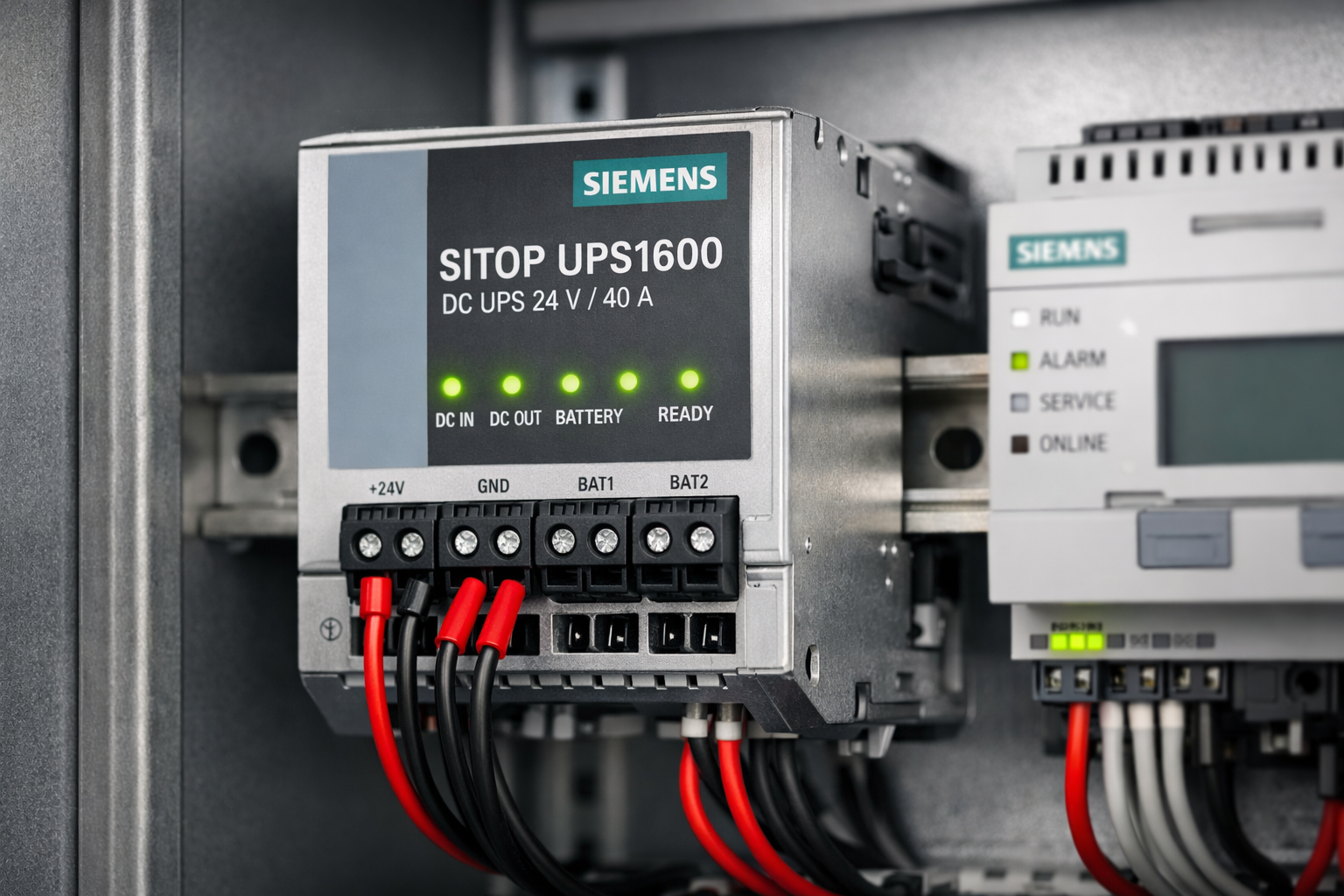
- DIN-Rail Mounting: For tidy panels, look for industrial UPS units that mount directly to the DIN rail, rather than sitting loosely in the bottom of the enclosure.
- Dry Contacts: Integrate the UPS status into your BMS. Most industrial units have a dry contact output for "On Battery" or "Low Battery." Connect this to a digital input on your controller so you get an alarm before the battery dies.
6. Maintenance and Testing
A UPS is a consumable item.
- Battery Replacement: Lead-acid batteries typically last 3–5 years. Schedule proactive replacement.
- Self-Test: Many modern units perform automatic self-tests, but a manual function test (cutting mains power to the panel) should be part of your annual preventative maintenance.
7. Summary
Integrating a UPS is a small investment that protects the expensive "brains" of your building. It prevents nuisance alarms, protects hardware from dirty power, and ensures you maintain visibility during short outages.
At Controls Traders, we supply the necessary components to build reliable control panels, from Power Supplies and Relays to complete backup solutions.
Leave a comment
Popular Posts
A Practical Guide to Actuator Selection for HVAC Applications
Spring-Return vs Non-Spring-Return Actuators: Which Do You Need?
PICV Sizing and Selection Guide for HVAC Systems